
Need help deciding? Let’s schedule a personal walkthrough.
Explore HyHyve in action with our full-feature demo.
The best Roam Office alternative is HyHyve, combining modern design with full browser compatibility, seamless Microsoft Teams integration, and powerful customization. While Roam requires users to download a desktop app for access, HyHyve runs instantly in any modern browser. Unlike Roam Office’s fixed focus on virtual HQ environments and company culture, HyHyve offers flexible pricing and tools optimized for both remote collaboration and scalable online events, making it the ideal choice for professional, multi-use virtual workspaces.
💳 No credit card required | Unlimited time on Free plan
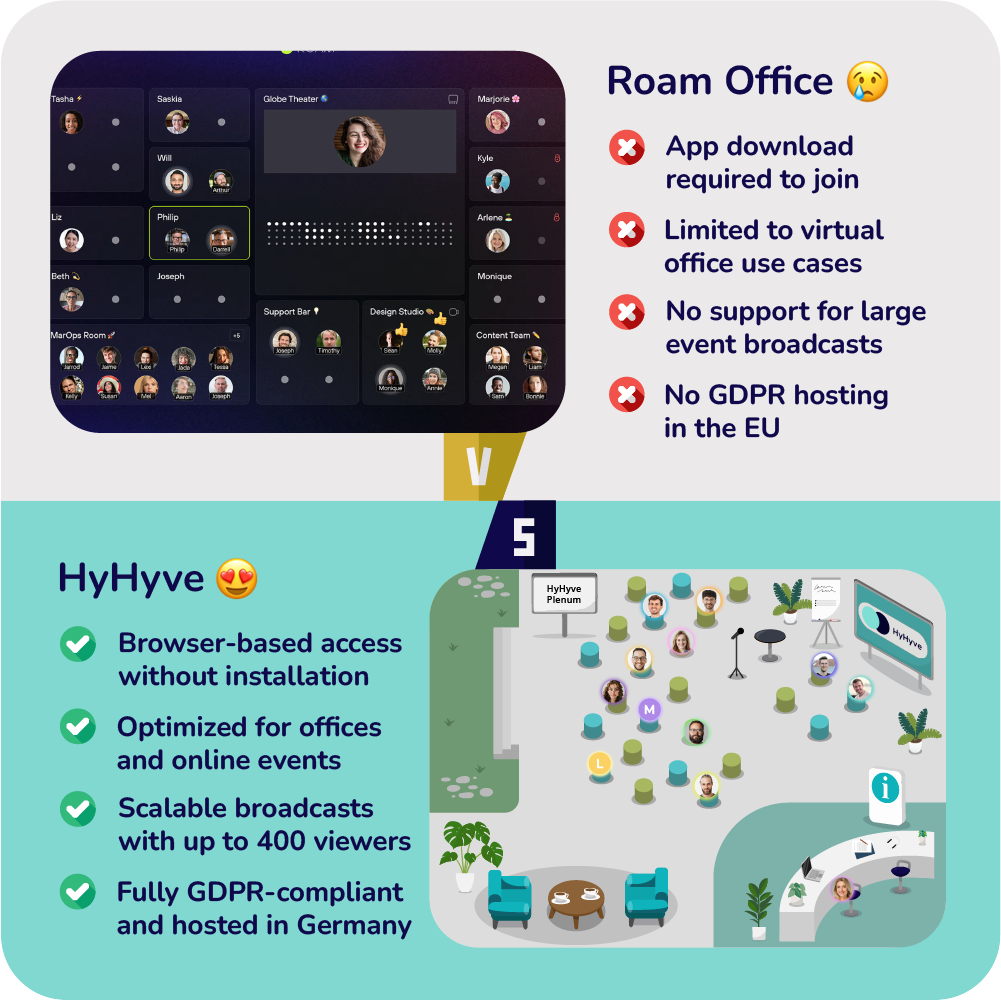
Roam Office is designed strictly for virtual offices. It lacks features tailored for virtual events, conferences, or large external meetings. In contrast, HyHyve supports both internal collaboration and scalable virtual events in one solution.
Roam Office recommends Chromium based browsers like Chrome for full functionality. Other browsers can cause issues. HyHyve works smoothly on Chrome, Firefox, Edge and Safari ensuring seamless access for all users.
As a US based service, Roam Office may not fully meet EU GDPR standards. HyHyve developed in Germany 🇩🇪 guarantees full GDPR compliance and gives you control over your data with downloadable DPA/AVV agreements.
HyHyve offers a professional alternative to Roam Office, removing browser limitations and meeting full GDPR standards. With its sleek design and intuitive interface, it streamlines onboarding and event management. Enjoy smooth access on all devices and browsers for business, education, and enterprise use. Upgrade your virtual workspace today.
💳 No credit card required | Unlimited time on Free plan
This Roam Office alternative guide makes it simple for you to choose the right virtual collaboration solution.
This table outlines the key factors for evaluating Roam Office alternatives. It helps you find the ideal platform for virtual events and online offices, focusing on costs, GDPR compliance, cross-browser support, scalability, usability, and essential features to deliver a smooth and professional collaboration experience.
Pricing
Roam Office 😢
Roam Office uses a usage-based pricing model, charging only for active users, those who log in that month, while guest access is free. Every new user enjoys a 14‑day trial, and unused users aren’t billed. Billing is monthly (no annual lock‑in), with no discounts or upsells. As of 2025, pricing starts at $18.88 per active member/month
HyHyve 😍
HyHyve provides a flexible pricing model for event organizers and virtual office users, charging only for meeting minutes with no limits on users or spaces.
Plans begin at €29.90 per month for 2,000 minutes, and the Virtual Office for Microsoft Teams starts at €8 per user per month.
A free plan includes 200 meeting minutes monthly. For custom options or questions, reach out to support@hyhyve.com.
GDPR / DSGVO
Roam Office 😢
Roam Office, a US‑based provider, emphasizes its focus on security and data protection through encryption and strict access management. However, as it operates outside the EU, companies needing full GDPR compliance should carefully review legal requirements before use.
HyHyve 😍
Based in Berlin, HyHyve fully complies with the GDPR and places strong emphasis on data protection.
Renowned German companies such as EnBW, Techniker Krankenkasse, and Deutsche Bahn rely on HyHyve’s secure infrastructure.
A downloadable DPA/AVV agreement is available to support strict EU data privacy requirements.
Browsers and Platforms
Roam Office 😢
Roam Office requires users to install its desktop or mobile app, as it does not offer a full browser-based experience. While Chromium-based browsers like Google Chrome and Microsoft Edge are recommended for optimal performance, limited or no support on other browsers restricts flexibility.
HyHyve 😍
HyHyve offers full support across all leading browsers and operating systems, including Chrome, Firefox, Edge, and Safari on Windows and Mac.
For the smoothest experience, we suggest using a Chromium-based browser like Chrome or Edge.
The best part? No downloads are required, HyHyve operates entirely in your browser or within Microsoft Teams. Explore features effortlessly.
Participant limit
Roam Office 😢
Roam Office is designed for small to mid-sized distributed teams and supports up to 50 participants per virtual space. This makes it ideal for organizations seeking a focused collaboration environment without the complexity of large-scale setups. Teams with higher participant needs may face performance limitations or require customized enterprise solutions.
HyHyve 😍
HyHyve allows up to 200 simultaneous participants per space, making it ideal for most virtual events. For higher capacity needs, this limit can be extended to 400 by reaching out to support@hyhyve.com.
To scale beyond that, up to 20 HyHyve spaces can be linked, supporting large conferences with thousands of users. HyHyve uses top-tier video and audio technology powered by Whereby and Microsoft Teams.
Meeting limit
Roam Office 😢
According to G2 user reviews, Roam Office currently supports smaller team sizes, as its virtual HQ is designed for companies under 50 employees. Feedback notes limited participant capacity per meeting or room, making it better suited for intimate groups rather than large-scale events.
HyHyve 😍
HyHyve supports up to 200 participants in spontaneous conversations (“bubbles”) and meeting rooms, ensuring fluid communication even during high-attendance sessions.
For broadcasts, the platform accommodates 200 speakers and 400 viewers simultaneously, making it a powerful solution for large virtual events and webinars.
Broadcast / Spotlight / Webinar limit
Roam Office 😢
Roam Office includes broadcast-style presentations where presenters can stream video, audio, or screen share to participants. However, Roam does not publicly disclose specific attendee limits for these sessions, so the maximum supported audience size remains unspecified.
HyHyve 😍
HyHyve’s broadcast feature supports up to 200 speakers and 400 viewers, making it ideal for webinars and large virtual events. It enables real-time interaction across multiple rooms and can scale with external streaming tools to reach thousands across 20 spaces.
Access restrictions
Roam Office 😢
Roam Office provides essential access control options to safeguard your virtual HQ:
Workspace access: Limit entry to invited team members and approved guests only.
Admin management: Assign admin roles to manage rooms, members, and content across your space.
Guest access: Invite external participants to join meetings without registration or additional setup.
HyHyve 😍
HyHyve offers customizable access settings to match your team’s security requirements. Depending on your subscription, you can activate:
Open access via link with username only
Email-verified login for registered users
Whitelisted emails for selected participants
Domain-based access restrictions
Password-protected entry points
Single Sign-On (SSO) with SAML or OAuth (e.g. Microsoft Entra, Azure)
Space customization
Roam Office 😢
Roam Office allows you to customize your virtual headquarters to match your team’s identity and workflows.
You can rename rooms, personalize layouts, and adjust privacy settings to support spontaneous interactions and structured meetings. These tools help create engaging, branded virtual workspaces.
HyHyve 😍
HyHyve offers full customization for virtual spaces, supporting PNG or JPEG background uploads. Whether you opt for photorealistic or isometric layouts, avatars adapt smoothly to your design. Use the editor to instantly update room labels and meeting topics.
For extra personalization, 3D avatars are available in select regions. For tailored customization or questions, reach out to support@hyhyve.com.
Recording
Roam Office 😢
Roam Office supports in‑platform video recording via its Magicast feature. Magicast allows you to capture video, audio, and screen sharing directly from a private office or meeting space. You can quickly start recording with a click, and recordings stop automatically when participants leave or you end the session
HyHyve 😍
HyHyve enables easy recording for bubbles, meeting rooms, and broadcasts, so nothing gets lost. Admins can control who can start or stop recordings, either all participants or just administrators.
All recordings are securely stored, have no time limits, and automatically stop when the last user leaves the session.
Languages
Roam Office 😢
Roam Office offers live captions, meeting transcripts, and Magic Minutes in over 16 languages, including English, German, French, Dutch, Chinese, Hindi, and Indonesian. This multilingual functionality enhances accessibility for global teams.
HyHyve 😍
HyHyve supports both English and German, ensuring accessibility for diverse international teams and users.
Looking for another language? Reach out to support@hyhyve.com to explore tailored multilingual options and expand your virtual platform’s global reach.
💳 No credit card required | Unlimited time on Free plan
Looking for a more versatile platform than Roam Office? HyHyve offers a sleek, business-ready solution focused on GDPR compliance and data security—developed and hosted in Germany 🇩🇪.
Explore More! Visit our full features page to discover how HyHyve can elevate your digital events and virtual offices.






HyHyve was perfect for our global conference with 200+ participants. Its intuitive use enabled active collaboration, idea sharing, and an authentic experience despite the distance. The custom card design added a personal touch.
Evonik Operations GmbH | Specialty Additives
Team SCM Strategy & Transformation

The interaction is intuitive and innovative. HyHyve’s maps can be customized and created a buzz with their attention to detail!
Joachim Haydecker
Customer Experience Manager at EnBW Energie Baden-Württemberg AG

HyHyve was a great solution for our digital event! Participants loved the networking opportunities. A big thank you to the HyHyve team for their excellent support!
Dr. Wiebke Evers
Project management consulting, Karg-Stiftung

Find answers to frequently asked questions about Roam Office alternatives. Dive into details on capabilities, pricing structures, customizations, and setup options to help you select the ideal virtual platform for your team or events.
Yes, using the full features of Roam Office requires installing its desktop app available for macOS, Windows, iOS, Android, and Linux. Guests can join via the web, but members perform best in the app.
Roam Office uses usage-based pricing, only active users (those who log in) are billed per month. Guests access the platform for free; inactive users aren’t charged.
Yes. Roam Office offers “Cloud Rooms” that allow multiple team members to join meetings from a shared physical device, making it flexible for hybrid office setups.
No embedded support is documented. Rooms require users to join via the app or guest web access; there’s no iFrame or embedding feature available.
You can customize your HQ’s layout by renaming, moving, resizing rooms, changing floors, and assigning seats using drag-and-drop editing.
Roam Office is currently not SOC 2 certified; while security is a priority, full GDPR, SOC 2, and HIPAA compliance are not yet officially achieved.
💳 No credit card required | Unlimited time on Free plan
HyHyve delivers an affordable virtual collaboration platform with flexible self‑hosting choices and far more customization than Remo offers. Its user‑friendly interface and enterprise-grade security make it a top choice for virtual offices and online events.
HyHyve features a clean, modern look that sets it apart from Gather.Town’s 8-bit game-like style. With scalable design, full Microsoft Teams support, and GDPR hosting in Germany 🇩🇪, it fits professional, educational, and enterprise use cases.
HyHyve offers structured, scalable virtual environments with enhanced branding, perfect for professional applications. In contrast to SpatialChat, HyHyve integrates directly with Microsoft Teams and includes intuitive tools for seamless meeting coordination.
HyHyve delivers a sleek virtual office environment without WorkAdventure’s pixelated visuals. It features advanced customization, GDPR compliance, and crystal-clear video. Tailored for scalable collaboration in professional, academic, or enterprise settings.
Discover a modern, business-focused virtual workspace built for productivity—not play.
Sleek, brand-ready design without distracting visuals
Reliable video quality with Microsoft Teams integration
Easy setup for all skill levels
Scalable and fully GDPR-compliant, hosted in Germany 🇩🇪
Need help deciding? Let’s schedule a personal walkthrough.
Explore HyHyve in action with our full-feature demo.

